
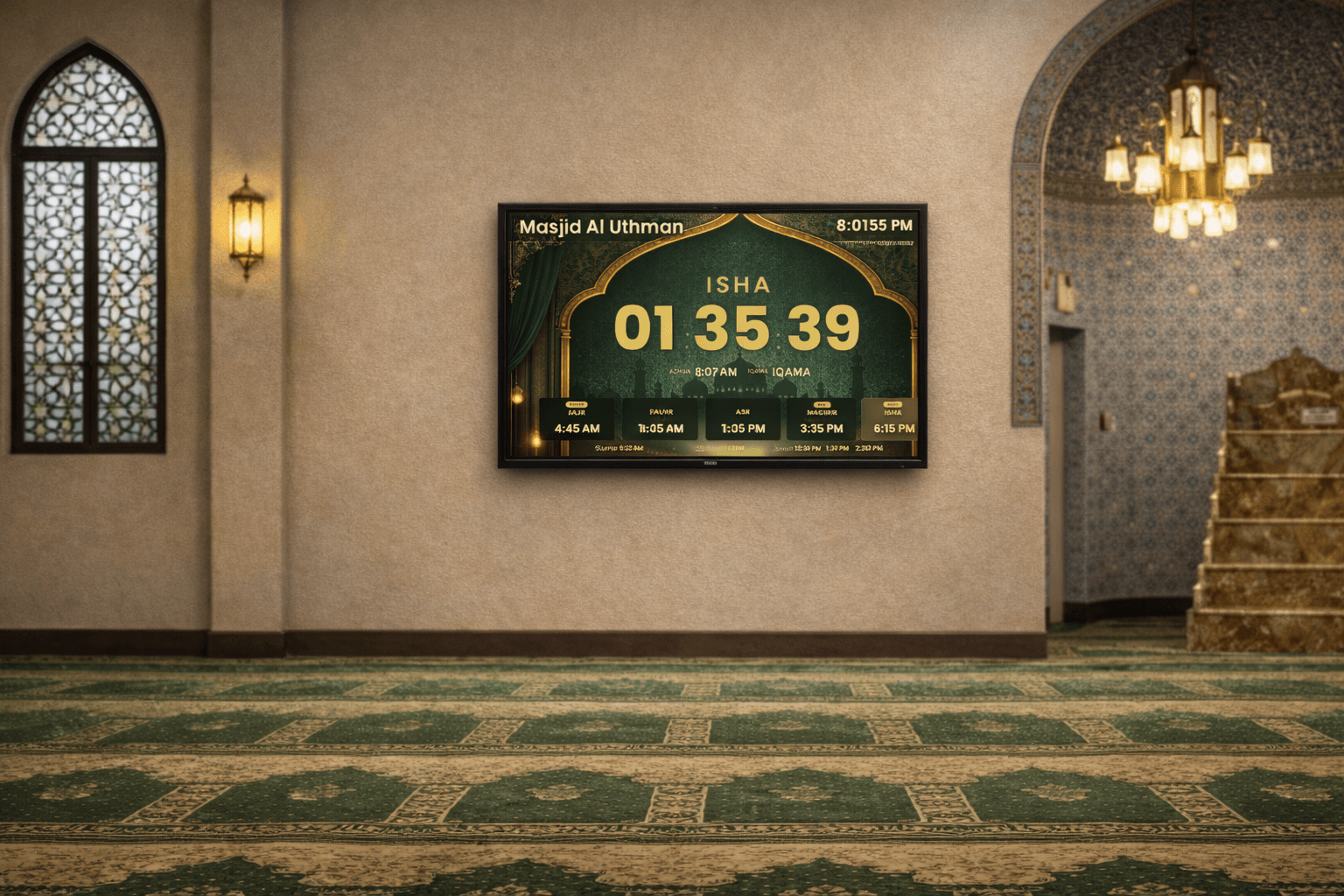
The modern prayer display your mosque deserves.
Turn any TV into a professional prayer time display. Iqama times, countdowns, announcements, donations, and more. Managed from a simple dashboard. No hardware needed.
Trusted by mosques worldwide

Makkah Masjid
Chicago, US

Minhaj ul Quran International
Copenhagen, Denmark

Masjid At-Taqwa
Manukau, New Zealand
Everything your masjid needs
One platform. Prayer times, engagement, and management.
Accurate Prayer Times
Auto-calculated adhan times with 8 methods. Set iqama times from your dashboard and changes appear on every screen instantly.
- ISNA, MWL, Diyanet, Egyptian & more
- Shafi & Hanafi Asr calculation
- Live countdown to next prayer
- Hijri date, Jummah times, Ramadan mode
- Per-prayer minute adjustments
- High latitude rules for northern regions
Beautiful & Customizable
10+ layouts designed for TV screens, from elegant to bold. 16 color themes, custom accents, and premium background layouts.
- 10+ layouts (Classic, Islamic, Spotlight...)
- Premium backgrounds (Ottoman, Orbit, Starlight)
- 16 light & dark themes
- Custom accent colors & font scaling
- Auto-rotate between layouts
- Upload your mosque's logo
Engage Your Community
Go beyond prayer times. Announcements, media slides, online donations, website embeds, and Home Assistant integration.
- Scrolling announcements on display
- Image, video & embed slides
- Online donations with Stripe
- Donation QR code on TV
- Website embed widget & public API
- Home Assistant automation
Set up in 5 minutes
Three steps. That's it.
01
Sign up & set times
Create a free mosque admin account. Enter your iqama times, pick a calculation method, and configure your display.
02
Pick a layout & theme
Choose from 10+ layouts and 16 color themes. Customize accent colors, fonts, and toggle features like Hijri date and Jummah display.
03
Open on your TV
Navigate to the display URL on any TV, Fire Stick, or tablet. Pair it with a 6-digit code. It updates automatically from there.
See it in action
Watch how AzanCast works
No signup required
Try it right now
Pick a layout, theme, and accent color. This is exactly what your TV will show.
Layout
Theme
Accent Color
Font
These are just a few of the layouts, themes, and colors to get you started. The admin dashboard has more of each, plus logo upload, font scaling, announcements, auto-rotate, media slides, and more.
Free to start. Pro when you're ready.
Core prayer display features are free forever. Upgrade to Pro for unlimited displays, all layouts, media slides, and lower donation fees.
Free
$0
Free forever. No credit card.
- 1 paired TV display
- 3 layouts, 6 themes
- Prayer times, countdown, Ramadan mode
- Announcements, donations, API
- 6 languages, Hijri date, Jummah
Pro
$20
/ monthor $169/yr (save 30%). 30-day free trial, no credit card required.
- Unlimited displays, independent settings
- All 10+ layouts, all 16 themes
- Premium backgrounds (Ottoman, Orbit, Starlight)
- Media slides, slideshow, logo upload
- 2% donation fee (vs 5% free)
Mobile App
Stay connected with your community
Get prayer time notifications, check iqama times on the go, and never miss a prayer at your local mosque. Available for your community members to download and stay in sync.
- Prayer time push notifications
- View your mosque's live iqama times
- Hijri calendar and Qibla direction
- Synced with your mosque admin dashboard
Download on the
App Store
Coming soon
Google Play
Frequently asked questions
None. AzanCast runs in a web browser. Open a URL on any smart TV, Amazon Fire Stick, tablet, or laptop. No apps, no dongles, no special hardware.
About 5 minutes. Sign up, enter your iqama times, pick a layout, and open the display URL on your TV. That's it.
Every new mosque gets a 30-day free trial of the full Pro plan, no credit card required. After the trial, you can stay on the free plan (1 display, 3 layouts, 6 themes, prayer times, countdown, Ramadan mode, Jummah display, announcements, donations, and more) or upgrade to Pro for unlimited displays and all features.
Free: 1 display. Pro: unlimited. Each TV gets a unique pairing code and can have its own layout, theme, and language.
Yes. Add scrolling text announcements, upload images, embed YouTube videos, and auto-rotate between content slides and prayer times.
Yes. ISNA, MWL, Egyptian, Umm al-Qura, Karachi, Tehran, Diyanet (Turkey), and Jafari. Plus Shafi and Hanafi Asr calculation, high latitude rules, and per-prayer minute adjustments.
Connect your bank via Stripe in minutes. Create a branded donation page, accept one-time or recurring gifts, run campaigns with goals, and show a QR code on your TV for instant mobile donations.
Yes. Copy one line of code to add a live prayer times widget to your mosque's website. Or use our public JSON API for custom integrations and mobile apps.
Ready to upgrade your masjid's display?
Set up takes 5 minutes. Every mosque gets 30 days of Pro free. No credit card required.
Questions? Email azancast@gmail.com
Looking for personal adhan reminders on your Alexa? Check out AzanCast for personal use →